
• Link to Mail
  • Link to Facebook
  • Link to Instagram
  • Link to LinkedIn
Questions? Send us a message via live chat or our contact form.
Full Service Design Agency - Multimedia Design Agency
  • PORTFOLIO
    • Our Work
    • Our Clients
  •    MAILCHIMP
    • MAILCHIMP TEMPLATES
      • Compare Our Mailchimp Packages
      • Orangutag Mailchimp Package
        • PSD to Mailchimp Conversion
      • Mini Marmoset Mailchimp Package
        • up to 5 content variants/blocks
      • Curious Chimp Mailchimp Package
        • up to 10 content variants/blocks
      • Mailroom Monkey Mailchimp Package
        • up to 10 content variants/blocks + standard list setup and form customization
      • Gorilla Marketer Mailchimp Package
        • up to 10 content variants/blocks + advanced list setup and form customization
      • Additional Content Variant Blocks
        • Expand your Mailchimp template!
    • PREDESIGNED MAILCHIMP TEMPLATES
      • Simplicity Mailchimp Template
    • ABOUT OUR TEMPLATES
      • MAILCHIMP TEMPLATE USER GUIDE
        • Our complete online Mailchimp template user guide
      • Template Spotlight: Edoughble
      • Ours vs. Theirs | Mailchimp Template Features
      • The Ins and Outs of Variable Content Blocks or Variant Selection
      • Scalable (Mobile Friendly) versus Responsive Integration
      • Bulletproof Mailchimp Templates
      • High Density Display Optimization
      • Which Mailchimp package is right for me?
      • Which Mailchimp package add ons are right for me?
    • ADDITIONAL MAILCHIMP SERVICES
      • Additional Variant Content Blocks
      • Mailchimp Campaign Design
      • Mailchimp GDPR Consent Compliance
      • Mailchimp Integration
      • Mailchimp Landing Pages
      • Mailchimp List Setup and Customization
      • Mailchimp Marketing Automation
      • Mailchimp Template Restoration
      • Mailchimp Template Troubleshooting
      • Mailchimp Training
  • SERVICES
    • EMAIL MARKETING
      • Mailchimp Campaign Design
      • Mailchimp Integration
      • Mailchimp List Setup and Customization
      • Mailchimp GDPR Consent Compliance
      • Mailchimp Template Design
      • Mailchimp Template Troubleshooting
      • Mailchimp Training
      • PSD to Mailchimp
    • MARKETING AUTOMATION
      • Landing Pages
      • Marketing Automation Workflow
    • GRAPHIC DESIGN
      • Contact us for more info
    • PHOTOGRAPHY
      • Contact us for more info
    • WEB DEVELOPMENT
      • Contact us for more info
      • Pueblo Web Design
  • BLOG
  • CONTACT
  • HOW WE WORK
  • HELP
    • HELP
      • Help
        • Find answers to frequently asked questions and access helpful knowledgebase articles and tutorials
    • CLIENT CENTER
      • Client Center
        • Helpful resources, links, and information
    • TEMPLATE USER GUIDE
      • MAILCHIMP TEMPLATE USER GUIDE
        • Our complete online Mailchimp template user guide
  • Click to open the search input field Click to open the search input field Search
  • Menu Menu
  • Shopping Cart Shopping Cart
    0Shopping Cart

Top 5 Ways to Expedite Your Project Process

December 26, 2011/in Company News

Create a profile identity you’ll easily remember.

Within 24 hours of payment receipt you’ll receive an email inviting you to join our project management system, Basecamp. Basecamp is an easy to use web based project management system allowing you to track the status of your project every step of the way. Your log in credentials are key and give you access to everything you need to get your project underway.
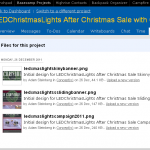
Visit the files area to download your important documentation, if you haven’t already.

In the files area of the project management system you’ll find documentation pertaining to your project including agreements, worksheets, guides, questionnaires, how-tos, and more – some of which may  need to be signed and returned to our office.
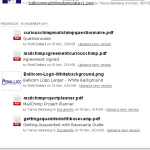
 

Carefully read, review, sign, and return your completed documentation to our office as quickly as possible.

The sooner you return your completed project documentation the quicker we can get your project underway. Your thorough review and completion of project questionnaires and worksheets is vital to the positive outcome of your project.

We invite you to review these documents thoroughly and in their entirety to ensure you’re getting the most out of our services. Documentation should be returned within 7 days of purchase/invoice payment. Make sure you tick the box to alert us to the fact that you’ve uploaded your documentation and design collateral .
 

Upload your design collateral to our project management system for our design staff to use during the design and development phase.

Design  collateral is anything pertaining to your business that may help us in our current project. This could be your company’s logo artwork, other graphical elements that represent your business, corporate stationary, publications, etc.
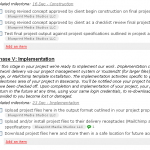
 

Log in to Basecamp and review your upcoming tasks, milestones, and calendar events.

Within Basecamp you can access and review your upcoming tasks and milestones, marked by a label with your company or organization name or a person within your agency who is responsible for completing said task. When you’ve completed listed tasks and milestones be sure to tick off the items as completed in your To-Dos section alerting our agency to move your project forward; along to the next phase.

In the Calendar area of your project you’ll find a delivery timeline which adjusts in real time and will reflect the latest on your project status dependent on the status of your returned documents, payment receipt, etc. Check often to ensure that documentation, collateral, and feedback are all provided in a timely manner. You can even activate email updates to receive a daily digest notifying you of any to-do items or milestones that were added or completed in the last day.

Share this entry
  • Share on Facebook
  • Share on X
  • Share on Pinterest
  • Share on LinkedIn
  • Share on Tumblr
  • Share on Vk
  • Share on Reddit
  • Share by Mail
https://blueprintmediastudios.com/wp-content/uploads/documentation.png 484 534 Tanya Steinberg https://blueprintmediastudios.com/wp-content/uploads/logo-w-partner-badge.png Tanya Steinberg2011-12-26 10:51:032016-08-06 14:54:56Top 5 Ways to Expedite Your Project Process

Latest News

  • Adding the Mailchimp Required media:content Tag to your WordPress RSS Feed OutputSeptember 28, 2018 - 12:43 pm
  • Connecting Your Site to MailchimpMarch 8, 2018 - 1:59 pm
  • We’re Not Just Mailchimp Experts, but PartnersMarch 2, 2018 - 10:40 pm
  • We’re Off to Atlanta (and Mailchimp HQ!)February 26, 2018 - 8:00 am
  • Template Spotlight: EdoughbleAugust 8, 2017 - 12:38 pm

Prefer to receive updates via email?

Subscribe
View a recent issue | MailChimp Powered by Mailchimp

READY TO PLACE AN ORDER?

Use our convenient online ordering system or give us a call at 888 476 6168 to place your order via telephone.

Our online ordering system is the quick, secure way to place your order and allows your company to get started quickly – even outside normal business hours, on holidays, and during weekends. Once your order is placed you’ll receive immediate download access to key documentation required for your project (if any).

Build your brand with expert insight and recommendations from our MailChimp Partners

direct to your inbox

Sign me up!
View a recent issue | MailChimp Powered by Mailchimp

ABOUT US

About Us
Clients
How We Work

NEED HELP?

Find answers to frequently asked questions and access helpful knowledgebase articles and tutorials via our Help section.

Search Search
Copyright © 2025 Blueprint Media Studios LLC PO Box 7922 Pueblo West, CO 81007-2854. All rights reserved. Policies | Privacy Policy | Cookie Policy | Data Access Request
  • Link to Mail
  • Link to Facebook
  • Link to Instagram
  • Link to LinkedIn
Link to: Guide to Creating Custom Mailchimp Email Layouts (For Designers) Link to: Guide to Creating Custom Mailchimp Email Layouts (For Designers) Guide to Creating Custom Mailchimp Email Layouts (For Designers) Link to: Posting Messages to Basecamp: A How-To Tutorial Link to: Posting Messages to Basecamp: A How-To Tutorial Posting Messages to Basecamp: A How-To Tutorial
Scroll to top Scroll to top Scroll to top